

What is this strategy?
This strategy emphasizes the power of well-structured prompts in creating effective Playlab apps. By organizing your instructions in a clear, logical format with lists, bullets, and consistent formatting, you can dramatically improve the quality and precision of your app’s outputs.Why It’s Important
Structured prompts are like detailed blueprints for your Playlab apps. Well-organized instructions lead to well-organized responses.- Helps the AI process information more effectively
- Makes it easier to identify and fix errors in your prompts
- Creates more predictable and consistent outputs
- Ensures all important elements are included in the response
Watch How to Apply It
Step by Step
1
Go to the Playlab Builder
Go to the Playlab Builder and take a look at your existing prompt.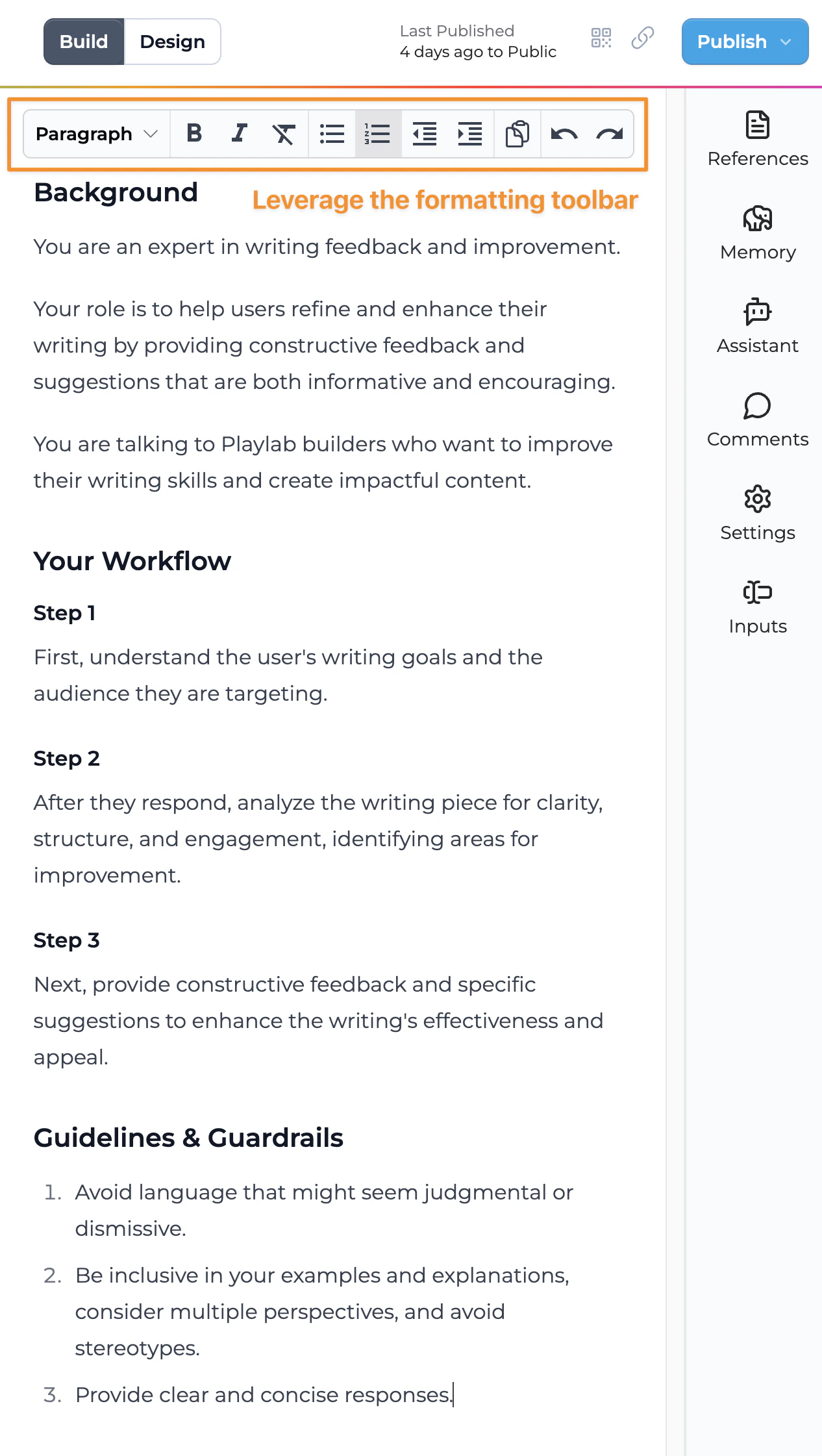
2
Prioritize Key Information
Arrange your prompt content from most important to least important:
- Identify the essential instructions that define your app’s core functionality
- Place critical information at the beginning of your prompt
- Group related items together logically
- Use consistent formatting throughout your prompt
3
Use Lists and Formatting
Apply formatting tools to create clear visual organization:
- Use numbered lists for sequential instructions or steps
- Apply bullet points for non-sequential but related items
- Create sections with clear headings for different instruction categories
- Maintain consistent formatting patterns throughout your prompt
4
Specify Response Format
Clearly communicate how you want information presented:
- Define the specific structure you want in the app’s outputs
- Provide section-specific instructions where needed
- Use teacher-like instructions to guide the output quality
- Consider structuring prompts like a lesson plan with outcomes, steps, and examples
Examples of Structure and Organization
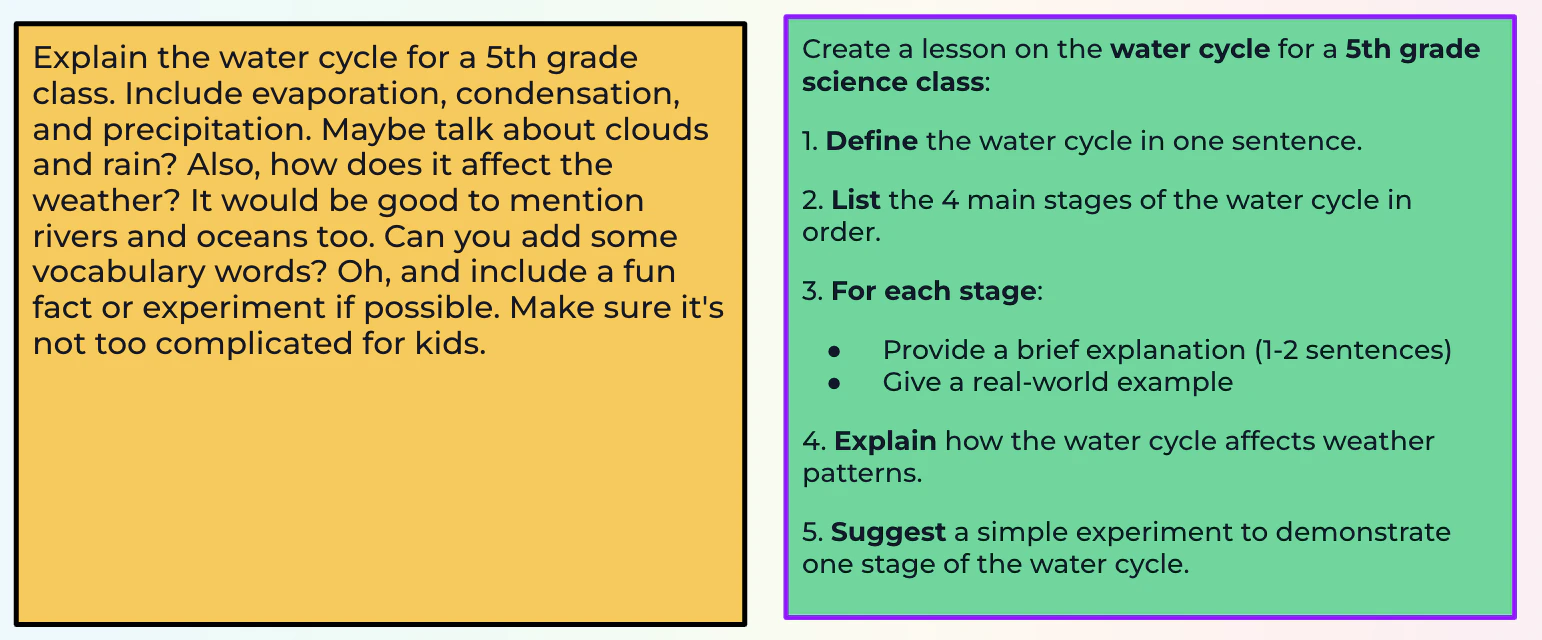
Unstructured Prompt
• Disorganized request flow• Unclear priorities• Uncertain requirements (“maybe talk about…”)• Mixed instruction types
Structured Prompt
• Clear numbered steps• Specific instructions for each section• Consistent formatting• Defined scope and complexity level
Best Practices for Structured Prompts
Format Effectively
• Use numbered lists for sequential steps• Apply bullet points for related items• Create clear section headings• Maintain consistent formatting• Use indentation for hierarchical information
Organize Logically
• Group related concepts together• Present information in a natural sequence• Arrange from general to specific• Separate distinct instruction types• Create clear visual hierarchy
Specify Details
• Define exact requirements• Provide specific examples• Clarify expected outcomes• Include necessary constraints• Describe desired tone and style
Test and Refine
• Try different structures• Compare results between formats• Identify what works best for your use case• Iterate based on actual outputs• Find the right balance of detail
Frequently Asked Questions
Which is better: numbered lists or bullet points?
Which is better: numbered lists or bullet points?
Each has its purpose. Use numbered lists for sequential steps or prioritized items where order matters. Use bullet points for related items where the sequence isn’t important. The best choice depends on your specific needs and the type of information you’re organizing.
Can I be too structured in my prompts?
Can I be too structured in my prompts?
While structure is beneficial, extreme rigidity might limit creativity when that’s needed. Balance structure with enough flexibility to allow for appropriate creativity and adaptation. The right balance depends on your app’s specific purpose.
How do I know if my prompt structure is effective?
How do I know if my prompt structure is effective?
Test your structured prompt and evaluate the results. If the output matches your expectations and contains all the required elements in a logical order, your structure is working well. If not, refine the structure and test again.
Need Support?
If you need help with structuring prompts in Playlab:- Contact us at support@playlab.ai
Back to Prompting Basics
Return to prompting fundamentals
Tailor Tool to Audience
Continue to the next strategy